
Table of Contents (10 sections)
Understanding Smartphone Cameras
Smartphone cameras have evolved dramatically over the past decade. Today's devices come equipped with multiple lenses, high-resolution sensors, and advanced software capabilities. The key to mastering smartphone photography is to understand how these elements work together to produce stunning images. For example, most recent models feature wide-angle and telephoto lenses, which allow photographers to capture different perspectives without needing additional equipment.
The importance of light cannot be overstated; an estimated 80% of a photo's success relies on lighting conditions. Utilize natural light, as it produces softer, more appealing images. According to The Verge, shooting during the golden hour—shortly after sunrise or before sunset—can yield the best results due to its warm, diffused light. Understanding these fundamental aspects is the first step toward optimizing your smartphone camera usage.
Optimal Camera Settings
Adjusting your smartphone camera settings can significantly impact your photography. Most smartphones offer various modes such as night mode, portrait mode, and pro or manual mode. Night mode automatically enhances low-light images, while portrait mode can create a beautiful background blur effect, resembling that of DSLR cameras.
For those venturing into manual mode, consider adjusting the following settings:
- ISO: Determines the sensitivity of the camera sensor to light. A lower ISO (100-400) is ideal in bright conditions, while a higher ISO (800+) can help in darker environments, but be cautious of potential noise.
- Shutter Speed: Controls how long the camera's sensor is exposed to light. A faster shutter speed (1/500s) is great for action shots, while a slower speed allows more light in for low-light conditions.
- White Balance: Adjusts the color balance of your photos, helping achieve more accurate colors based on the light source. For instance, if you're shooting under incandescent bulbs, adjusting the white balance can prevent photos from appearing overly orange.
Making these adjustments allows for greater creativity and control over your photography.
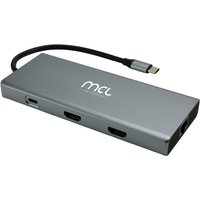
MCL 10-PORT DOCKING STATION HDMI station d'accueil Tablette/Smartphone/ordinateur portable Noir, Gris
Topbiz FR
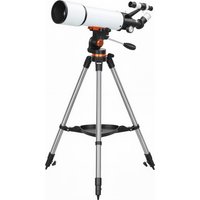
Outsunny Télescope Astronomique 80 mm avec Monture EQ, 2 oculaires et adaptateur smartphone, 92x92x130 cm, Blanc et Noir
Aosom FR
Techniques for Better Photos
Once you understand your camera settings, implementing effective techniques can further enhance your photos. Here are some strategies to get started:
- Rule of Thirds: Imagine dividing your frame into a 3x3 grid. Place important elements along these lines or at their intersections for a more balanced composition. Most smartphone cameras allow you to enable a grid to help you visualize this.
- Leading Lines: Use natural lines within your environment to draw the viewer’s eye into your image. Roads, paths, or even the edges of buildings can guide the viewer's focus.
- Perspective: Experiment with angles and perspectives. Taking a shot from a lower or higher vantage point can provide unique and engaging photos. According to National Geographic, varied perspectives can turn ordinary subjects into stunning visuals.
By refining your techniques, your smartphone photography can reach impressive new heights!
Editing for Excellence
Editing is a crucial part of the smartphone photography process. Apps like Snapseed, Lightroom Mobile, or VSCO enhance your photos after capture. Focus on essential adjustments:
- Exposure and Contrast: Adjust exposure settings to ensure your image is not too dark or bright. Increasing contrast can make colors pop and give depth to your photos.
- Color Correction: Utilize color grading to match the tone you want; subtle adjustments can dramatically change the mood of your image.
- Crop and Straighten: Often, a simple crop can improve composition. Use the rule of thirds here too and align horizons to make your images more appealing.
Remember, less is often more during editing. Aim for a natural look rather than over-processing your photos.
Common Mistakes to Avoid
Even experienced smartphone photographers make mistakes. Here are some common pitfalls:
- Ignoring Lighting Conditions: Shooting in harsh midday light can lead to harsh shadows and overexposure. Opt for softer lighting or seek shaded areas instead.
- Messy Backgrounds: Always check your background before taking a shot. Cluttered or distracting backgrounds can detract from your subject.
- Overusing Digital Zoom: Digital zoom can lead to pixelated, low-quality images. Instead, try to move closer to your subject or crop later during editing.
Avoiding these missteps can lead to cleaner, more professional-looking photos.
Checklist for Perfect Shots
- [ ] Check lighting conditions
- [ ] Clean your camera lens
- [ ] Adjust camera settings (ISO, shutter speed)
- [ ] Apply the rule of thirds
- [ ] Review the background for distractions
- [ ] Use a tripod or stabilizer for steady shots
- [ ] Experiment with angles and perspectives
- [ ] Edit for exposure, contrast, and color balance
Resources & Recommendations
To further enhance your smartphone photography skills, we've selected several products that can aid your journey:
- A high-quality smartphone docking station can help manage your charging needs while shooting.
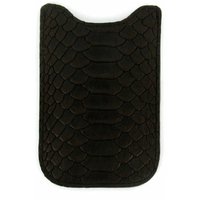
- An ergonomic phone case adds protection and grip, ensuring stability during shots.
- A lightweight tripod can drastically improve shot stability and composition.
- Consider using a telescope adapter for unique astrophotography opportunities.
Utilizing these products effectively can make a noticeable difference in your smartphone photography journey.
📺 For further exploration:
Explore advanced smartphone photography techniques and tips on YouTube: smartphone camera tips 2026.
Glossary
| Terme | Définition |
|---|---|
| ISO | La sensibilité du capteur de la caméra à la lumière, influençant la clarté de l'image. |
| Shutter Speed | La durée d'exposition du capteur à la lumière, affectant la luminosité et la netteté des photos. |
| White Balance | Ajustement des couleurs d'une photo pour correspondre à la source de lumière, garantissant des teintes réalistes. |
---
📺 Pour aller plus loin : smartphone camera tips 2026 sur YouTube
Recommended products
Selected by our experts
MCL 10-PORT DOCKING STATION HDMI station d'accueil Tablette/Smartphone/ordinateur portable Noir, Gris
Topbiz FR
A smartphone docking station helps keep your device charged and ready for long photography sessions.
Etui Smartphone KITRIE Marron en cuir
3 Suisses FR
A sturdy smartphone case will provide protection and improved grip for taking steady shots.
Outsunny Télescope Astronomique 80 mm avec Monture EQ, 2 oculaires et adaptateur smartphone, 92x92x130 cm, Blanc et Noir
Aosom FR
A lightweight tripod can help stabilize your smartphone for clearer, sharper images.
